
Genmitsu Offline Controller (PROVer V2)
Genmitsu offline controller for the PROVer V2 with long-press continuous jogging
- Control electronics
- Fits 3018-PROVer V2
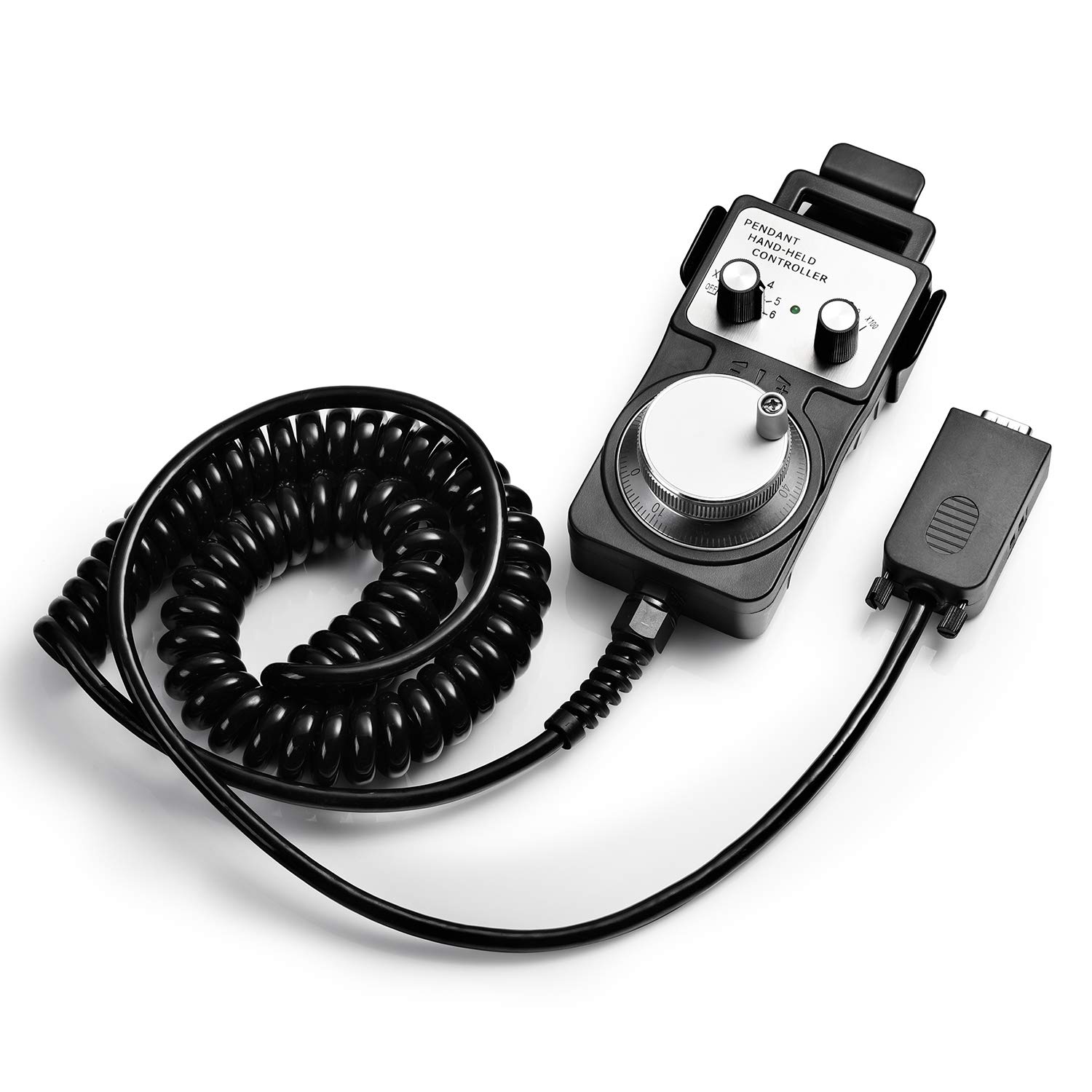
A handheld pendant that moves the axes the way a manual mill does: turn a metal wheel, feel each click, and creep the bit onto an edge or a surface without touching the keyboard.
An MPG, short for manual pulse generator, is the wheel found on the front of industrial CNC mills. Each click of the wheel sends a pulse, the controller turns each pulse into a small move, and the operator steers the axis by hand at whatever pace feels right.
Genmitsu's version packs that into a black pendant with a metal wheel. The encoder behind the wheel gives 100 pulses per full turn, so each detent is one small, repeatable step.
Why bother, when a sender like Candle already has jog buttons? Keyboard jogging moves in fixed jumps and reacts after a delay over USB. A wheel responds immediately and stops the moment the hand stops, which is what matters when a 1/8-inch bit is a hair away from a finished face.
At 0.83 kg the pendant sits steady on the bench while the wheel turns. The Genmitsu 3018 entry covers which of the brand's machines carry the matching board.
| Spec | Value |
|---|---|
| Maker | SainSmart Genmitsu |
| Type | MPG (manual pulse generator) handwheel |
| Encoder | 100 PPR |
| Handwheel | Metal |
| Step multipliers | X1, X10, X100 |
| Speed control | Multiplier plus how fast the wheel turns |
| Axes controlled | X, Y and Z |
| Drivers | None needed |
| Connection | Plugs into the CNC machine's controller board |
| 3018 machines named | 3018-PROVer V2, 3018-PROVer Mach3, 3018-MX3 |
| Larger machines named | 4040-PRO, 4040 Reno, 3020-PRO MAX V2 |
| Weight | 0.83 kg |
| Colour | Black |
| Maker warranty | One year, with lifetime support |
Most of a handwheel's value shows up in the minute before a cut starts. Zeroing X and Y off the corner of a blank, or Z off its top, is fiddly with buttons and simple with a wheel.
The usual routine uses the multiplier as a coarse, medium and fine control. The high setting crosses the bed quickly, the low one closes the last fraction of a millimetre.
A touch probe does Z faster, and many owners use both. The probe handles tool changes; the wheel handles edges, bores and anything the probe cannot reach.
Maple, walnut and other hardwoods reward this care. A few tenths of a millimetre of edge offset shows up as a lopsided border on a sign.
Genmitsu names three 3018-size machines for this pendant: the 3018-PROVer V2, the 3018-PROVer Mach3 and the 3018-MX3. It also names the 4040-PRO, the 4040 Reno and the 3020-PRO MAX V2 among the larger frames.
The common thread is the controller board. These machines use Genmitsu boards with a port for the handwheel, so the pendant connects and works without drivers or firmware changes.
| Machine | MPG named | Notes |
|---|---|---|
| 3018-PROVer V2 | Yes | Pairs with the V2's own offline controller |
| 3018-PROVer Mach3 | Yes | Older PROVer variant |
| 3018-MX3 | Yes | Genmitsu's earlier 3018 line |
| 3018-PRO | No | Not in Genmitsu's list; its board is a different design |
| Other brands | No | Generic GRBL boards lack the port |
On a supported machine the steps are short. Power the machine off, plug the pendant into the handwheel port on the board, power up, and the wheel takes over jogging whenever it is used.
The PROVer Mach3 stands apart from the other two, since it runs Mach3 software rather than GRBL. The pendant still plugs into the machine's board rather than the PC, so the connection works the same way on all three frames.
For owners without a matching board, the upgrade order entry suggests which controller parts change jogging and zeroing most.


Three add-ons change how a Genmitsu 3018 is driven. They overlap a little, but each solves a different problem, and the handwheel is the one aimed at precise positioning rather than running files.
An offline controller runs G-code from a card and jogs with buttons. A Wi-Fi module sends files from a phone. The handwheel does neither; it gives fine, tactile control over where the bit sits.
| Add-on | Main job | Best for |
|---|---|---|
| MPG handwheel | Jog X, Y, Z by feel at X1–X100 | Edge finding, re-clamping, careful zeroing |
| Offline controller (PROVer V2) | Run SD-card files, jog, spindle on/off | Garage machines with no laptop |
| GGW-UART Wi-Fi module | Send G-code and monitor from a phone | Several machines, remote checks |
For most PROVer V2 owners the order is offline controller first, handwheel second. Running jobs away from the computer changes the daily routine more than finer jogging does. Genmitsu names both for the PROVer V2, so the pendant can join later without replacing anything already fitted.
Check the machine model, confirm the board has the handwheel port, and leave room on the bench beside the frame. The pendant earns its space for owners who treat the 3018 like a small mill; for pure sign-carving it often sits in a drawer.
Genmitsu does not list the 3018-PRO. It names the 3018-PROVer V2, 3018-PROVer Mach3 and 3018-MX3, whose boards have the handwheel port.
No driver is needed. It connects to the machine's controller board and works once the machine powers up.
They scale how far the axis moves per click of the 100 PPR wheel. X100 crosses the bed, X1 makes the finest moves for touching off.
Generic GRBL boards have no handwheel input, so it is not a match for other brands' 3018 machines.