Top 3018s
Handwheel pendant · 3018-PROVer, 3018-MX3 · 100PPR

MPG Pendant for 3018-PROVer

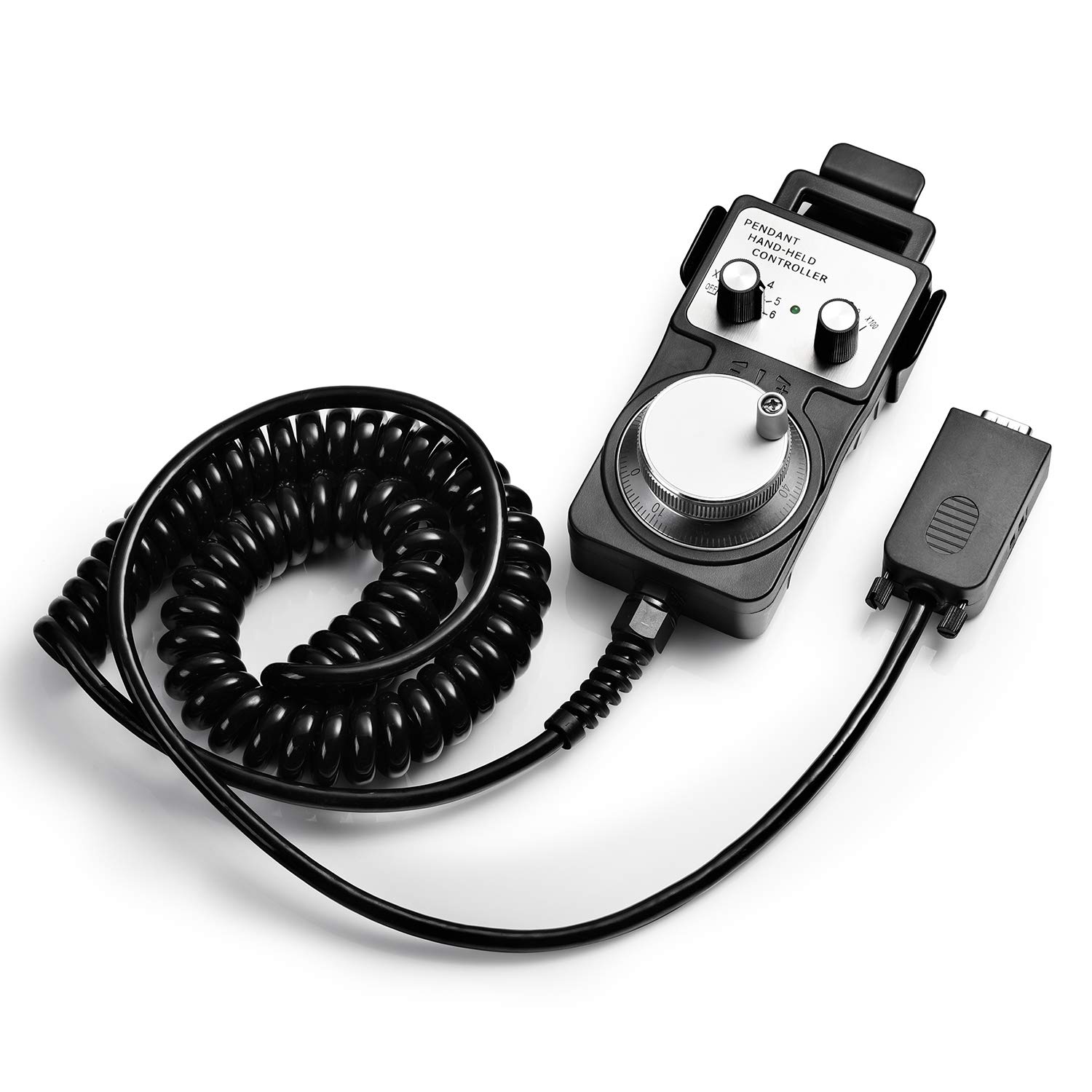
A manual pulse generator pendant with a metal 100PPR handwheel and x1, x10 and x100 steps, sold for the Genmitsu 3018-PROVer and 3018-MX3. It moves X, Y and Z by hand, the way a machinist sets up on a mill.

  • AxesX, Y, Z
  • WheelMetal, 100PPR encoder
  • Stepsx1, x10, x100
  • SetupNo driver; plugs into the board
  • Fits3018-PROVer, 3018-MX3
  • SizeAbout 135 × 69.5 mm
Suits
  • PROVer and MX3 owners who set work zero by eye on edges and corners
  • Jobs that start from a feature on the stock, not the corner of the bed
  • Anyone who prefers a wheel to jog buttons on a screen
Skip if
  • The 3018-PROVer V2, which is not in its model list
  • Running jobs: it positions the machine, it does not stream files
Get it here

Turning a metal handwheel to jog the 3018-PROVer by feel

Jog buttons move a 3018 in jumps. A handwheel moves it the way a manual mill moves: turn slowly and the axis creeps, turn fast and it travels, stop turning and it stops exactly where your hand did.

This pendant brings that feel to the Genmitsu 3018-PROVer and 3018-MX3. It is a manual pulse generator, or MPG: a metal wheel on a 100 pulse-per-revolution encoder, with a selector for the axis and another for the step size. Each click of the wheel sends pulses to the controller board, and the board moves the chosen axis to match.

What it does on the bench:

  • Positions X, Y and Z from a handheld unit, without touching the computer.
  • Offers three step ranges, x1, x10 and x100, from a fine creep to a fast traverse.
  • Scales with your hand, since jog speed follows how fast the wheel turns.
  • Needs no driver; it connects to the controller board and works.

The pendant is about 135 by 69.5 mm, small enough to hold in one hand while watching the bit with your eyes a few centimetres from the stock.

It does one job only. It positions the machine for setup, touch-offs and inspection, and it does not store or run G-code. Jobs still come from the computer, or from an offline controller on machines that have one.

The model list names the 3018-PROVer and 3018-MX3, not the 3018-PROVer V2. V2 owners should look at Genmitsu's own MPG handwheel, which lists the V2.
Measurements

The spec log

SpecValue
TypeMPG handwheel pendant (manual pulse generator)
Axes controlledX, Y, Z
HandwheelMetal
Encoder100 PPR
Step rangesx1, x10, x100
Jog speedFollows how fast the wheel is turned
Output circuitOpen collector, complementary, long-line types listed
Resolution, as printed25 / 100
DriverNone needed
ConnectionPlugs into the machine's controller board
Compatible machinesGenmitsu 3018-PROVer, 3018-MX3
Pendant sizeAbout 135 × 69.5 mm
Package size11.81 × 7.87 × 3.94 in
In the box1 MPG handwheel controller set

x1, x10, x100: touching off on a PCB blank and a walnut edge

Most 3018 jobs zero on the corner of the stock, and a jog button gets close enough. The handwheel earns its place on jobs that start from a feature: the edge of a board already cut, the centre of a hole or the surface of a thin PCB blank.

The three ranges work like gears on a manual mill:

RangeUse it for
x100Crossing the bed, parking the gantry
x10Approaching the stock, rough alignment
x1The final approach to an edge or surface

Touching off on the edge of a walnut board, for a job that has to line up with an existing cut:

  1. Select X and x100, then wheel the bit to within a few millimetres of the edge.
  2. Drop to x10, lower Z beside the edge and creep closer.
  3. Switch to x1 and turn one click at a time until a slip of paper between bit and edge just drags.
  4. Set X zero in the software, adding half the bit diameter for the offset.
  5. Repeat on Y for the adjacent edge.

On a PCB blank the handwheel helps with Z. Isolation milling works to depths of a tenth of a millimetre or less, and creeping down at x1 onto the copper, watching for the first scratch, gives a precise zero where a probe is not available.

  • Turn slowly at x100; a fast spin covers ground quickly and can overshoot.
  • Keep a hand near the stop button during the approach.

Centring on a hole works the same way. Touch off on the left and right walls at x1, note both X positions, and move to the midpoint; repeat on Y. It is slower than a probe routine, but it needs nothing beyond the pendant and a steady hand.

In the lineup

Where it lands among 3018 gear

3018 CNC machine models by type, September 2026. Highlighted: MPG Pendant for 3018-PROVer.

Wiring the pendant to the PROVer board and checking it first

The pendant connects to the controller board, not to the computer. That is why it needs no driver, and also why it only works on boards built for it.

The PROVer and MX3 named in its model list are the boards it is sold to plug into. First, look at your board for a port intended for a handwheel or MPG, and check the manual that came with the machine.

First power-up, step by step:

  1. Power the machine off before connecting the pendant.
  2. Plug the pendant into the board's handwheel port.
  3. Power up and connect the control software as usual.
  4. Select an axis and x1, then turn the wheel one click; the axis should move a small step.
  5. Check direction: clockwise should move the axis the way you expect, or note that it runs reversed.

The listed output types, open collector, complementary and long-line, describe how the encoder signals the board. They matter only if you are wiring the pendant into a board other than the PROVer's. For the named machines, it is a plug-in part.

Care for a handheld pendant is mostly about the cable:

  • Hang the pendant off the frame when not in use, so it cannot fall into the work area.
  • Route the cable away from the gantry and the spindle cable.
  • Keep chips off the wheel; a crunchy wheel usually means dust in the bearing.

A handwheel pairs well with a touch probe. The wheel places the bit precisely in X and Y, and the probe sets Z, so each part of setup uses the tool that suits it.

Swap-ins

Three other ways to go

Genmitsu's own, lists the V21 Genmitsu MPG Handwheel Controller
Genmitsu MPG Handwheel Controller
Genmitsu's MPG handwheel has the same x1, x10 and x100 steps and lists the 3018-PROVer V2 and 4040 machines.
  • Control electronics
  • Fits 3018-PROVer V2, 3018-PROVer, 3018-MX3
Get it here
Probe and switches for the PROVer3 Genmitsu Essential Accessories Kit
Genmitsu Essential Accessories Kit
Genmitsu's Essential Accessories Kit adds a stop button, a Z probe and six limit switches to the 3018-PROVer and MX3.
  • Adds a job the stock machine lacks
  • Fits 3018-PROVer, 3018-MX3
Get it here

No-name pendant or Genmitsu's own MPG handwheel

The same pendant is sold under a long list of brand names, with identical titles and identical descriptions. That description closely matches Genmitsu's own MPG handwheel, but the model list is shorter.

FeatureMPG pendant (this one)Genmitsu MPG handwheel
WheelMetal, 100PPRMetal, 100PPR
Stepsx1, x10, x100x1, x10, x100
DriverNoneNone
Models listed3018-PROVer, 3018-MX33018-PROVer V2, PROVer Mach3, MX3, 3020-PRO MAX V2, 4040-PRO, 4040 Reno
WarrantyNot statedOne year, lifetime support

Choose Genmitsu's own handwheel if:

  • The machine is a 3018-PROVer V2 or a larger Genmitsu machine.
  • A stated warranty matters to you.
  • You may move the pendant to a 4040 later.

Choose this pendant if the machine is an original 3018-PROVer or a 3018-MX3 and you are comfortable with an unbranded part. Whichever badge it carries, the pendant is the same unit, with the same wheel, selectors and cable.

The model list is the deciding line. On an original PROVer or MX3, both are sold to plug into the same kind of port and do the same job. On anything newer, the Genmitsu unit is the one whose compatibility is stated, and a stated fit beats guessing whether a part will talk to the board.

Confirm the exact model on your machine's label, check the board for a handwheel port, and decide whether you need positioning only or a way to run jobs too. For running jobs away from a computer on the V2, see the Genmitsu offline controller. The Genmitsu 3018 line-up explains how the PROVer, PROVer V2 and MX3 differ.

Bench notes

Setup questions

Does the MPG pendant work with the 3018-PROVer V2?

It is listed for the 3018-PROVer and 3018-MX3, not the V2. Genmitsu's own MPG handwheel lists the V2.

Does the pendant need a driver?

No. It connects to the machine's controller board and works without a driver on the computer.

What step sizes does it offer?

Three ranges, x1, x10 and x100, and the jog speed also follows how fast the wheel turns.

Can it run G-code files?

No. It positions the axes by hand for setup; jobs still run from the computer or an offline controller.