Top 3018s
3-axis GRBL board · A4988 drivers · spindle or laser

F-Yi GRBL Controller Board

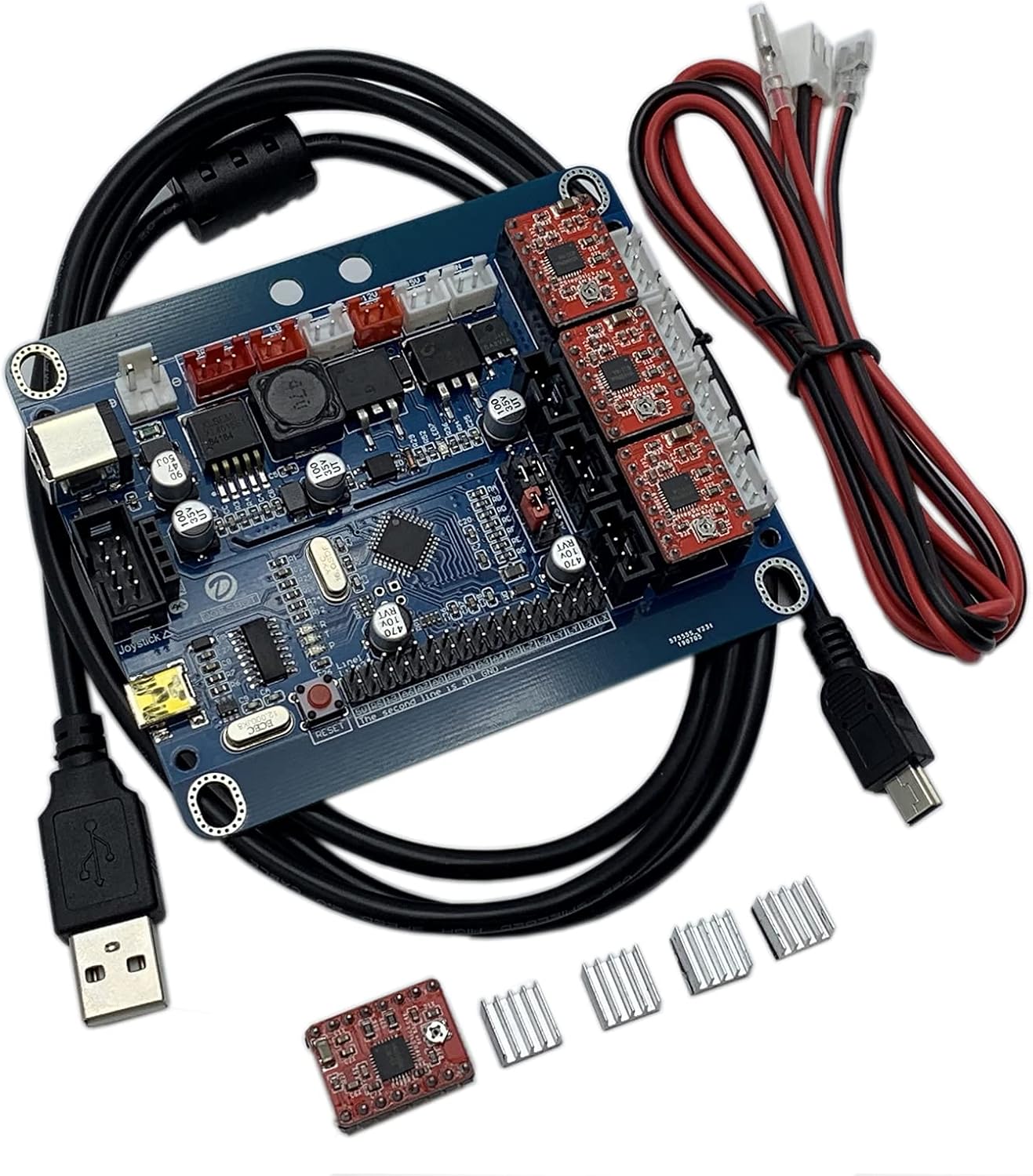
A bare 3-axis GRBL board for the small desktop routers and engravers: A4988 stepper drivers, a 5 A spindle or laser output with PWM, three limit inputs and a reset button, powered from 7 to 36V.

  • FirmwareGRBL 0.8, 0.9, 1.1; Benbox
  • InputDC 7–36V; 12–24V, 5–10 A advised
  • DriversA4988, up to 1.5 A per axis
  • Spindle outputSupply voltage, 5 A, PWM
  • Fits3018, 1610, 2418 frames
  • BoxBoard, 20 cm USB cable, 3 heat sinks
Suits
  • Replacing a dead controller on a generic 3018, 1610 or 2418
  • Laser engravers and routers that need PWM power or speed control
  • Builders comfortable with GRBL settings and a multimeter
Skip if
  • Owners who want E-stop and probe headers ready to plug in
  • Spindles drawing more than 5 A without a relay
  • A plug-and-play Genmitsu board replacement
Get it here

Reviving a 1610 or 2418 with a bare GRBL board

Small GRBL routers share a controller design: an Arduino-class chip running GRBL, three plug-in stepper drivers and a MOSFET output for the spindle. When that board dies, from a shorted spindle lead or a USB socket torn off the board, the F-Yi board slots in as a direct replacement for 3018, 1610 and 2418 frames.

What sits on the board, by function:

  • Three A4988 stepper drivers, one per axis, each good for up to 1.5 A. Three stick-on heat sinks come in the box for them.
  • A spindle output at supply voltage, rated 5 A, switched by M3 and M5 and speed-controlled by PWM on GRBL 0.9 and 1.1.
  • A fan output meant for cooling the spindle motor.
  • Three limit inputs, one at the minimum end of X, Y and Z.
  • A reset button that restarts the controller and doubles as an urgent stop.
  • USB to the computer, with a 20 cm cable.

It runs GRBL 0.8, 0.9 or 1.1 and also Benbox, the older laser-engraver software. On a 3018 the natural choice is GRBL 1.1 with Candle or UGS.

Headers to check. The board's input list names three limit inputs and a reset button. It does not name a probe or a separate E-stop header, so a Z probe or an external stop button needs a free pin and some wiring, or a board that has them.

For a basic 3018 that only needs to move, spin and home, that is enough. Frames and their standard boards are compared in the 3018-PRO guide.

Measurements

The spec log

SpecValue
Axes3 (X, Y, Z)
FirmwareGRBL 0.8, 0.9 and 1.1; Benbox supported
Input voltageDC 7–36V
Recommended supply12–24V at 5–10 A; match the laser's voltage when a laser is fitted
Stepper driversA4988, up to 1.5 A per axis
Spindle outputAt supply voltage, 5 A; external relay for larger spindles
Spindle controlM3 on, M5 off; PWM speed with GRBL 0.9 or 1.1
Laser3-axis laser engraving supported; PWM power control
Fan outputFor spindle motor cooling
Limit inputsX−, Y−, Z− (minimum end of each axis)
Reset buttonRestarts the system; usable as an urgent stop
ConnectionUSB, 20 cm cable included
Machines named3018, 3018 Pro, 1610, 2418
Travel settingSet in GRBL: 300 × 180 mm for a 3018, 240 × 180 mm for a 2418
Rated voltage24V
In the box1 GRBL control board, 1 USB cable, 3 heat sinks

Spindle, laser and PWM on a 5 A output

The spindle output sets the board's ceiling. It switches the supply voltage at up to 5 A, so on 24V it can feed about 120W. A stock 775 motor fits easily; bigger spindles need the board to drive a relay or a separate speed controller instead.

LoadOn a 24V supplyHow to connect
Stock 775, around 100WWithin the 5 A outputDirectly to the spindle terminals
20,000 rpm 775Start-up current can spikeDirect, with a supply that can start it
300W or 500W spindleBeyond 5 AThrough its own power supply and speed controller; board signals only
Diode laser moduleLaser voltage must match supplyPWM output to the laser driver

The laser rule deserves attention. F-Yi says the supply voltage should equal the laser's voltage, because the spindle output passes the supply straight through. A 12V laser head on a 24V board supply is a quick way to kill a laser driver.

GRBL settings that shape the output:

  • Setting 30, the spindle maximum, should match the top S value the CAM or laser software writes, often 1000 or 10000.
  • Setting 31, the minimum, is usually 0.
  • Setting 32, laser mode, goes to 1 for a laser and 0 for a spindle. In laser mode GRBL keeps moving through power changes and turns the beam off during rapids.

On a 3018 that swaps between spindle and laser, keep two saved settings lists, one per head, and paste the right one in before each job. It takes seconds and avoids the classic slip: laser mode left on while the spindle cuts. Laser heads, their voltages and the goggles to wear with them are covered in 3018 laser modules.

In the lineup

Where it lands among 3018 gear

3018 CNC machine models by type, September 2026. Highlighted: F-Yi GRBL Controller Board.

Setting 300 × 180 travel and steps after the swap

Fitting the board mostly means moving each plug over in turn. Photograph the old board before unplugging anything, then transfer stepper, spindle, limit and power leads to the same positions. The settings come next, and they are where most swaps go wrong.

  1. Stick the three heat sinks onto the A4988 driver chips.
  2. Connect X, Y and Z stepper leads, spindle, fan and any limit switches.
  3. Connect the 12–24V supply; the board accepts 7–36V but steppers and spindle run best at 24V.
  4. Plug in USB, open Candle or UGS and type the settings command to see the full list.
  5. Set steps per millimetre, maximum rates and travel for the frame.
  6. Jog each axis 10 mm and measure the move with calipers.

Values that depend on the frame:

  • Steps per mm (settings 100–102). A 1.8° motor at 1/16 microstepping on an 8 mm-lead screw needs 400. Check the screw lead and the microstep jumpers under the drivers.
  • Travel (settings 130–132). F-Yi's own note: 300 and 180 for a 3018, 240 and 180 for a 2418. Set Z to the frame's real Z travel.
  • Driver current. Each A4988 has a trim potentiometer. Keep current at or below 1.5 A, and lower if the drivers run hot even with heat sinks.
Limits are minimum-end only. Homing on this board runs toward X−, Y− and Z−; set the homing direction to match where the switches sit.

More on each GRBL setting is in 3018 CNC software.

Swap-ins

Three other ways to go

F-Yi, MYSWEETY, Doesbot or a 32-bit MKS board

Several replacement boards fit a 3018, and they differ in the details that matter after a failure: headers, drivers, voltage range and whether Wi-Fi or a screen comes along. The F-Yi board sits at the simple end, with the widest input range of the group.

BoardDriversInputStands out for
F-Yi GRBL boardA49887–36VWide input range, Benbox support
MYSWEETY GRBL 1.1fA498824V150W spindle output, 2-pin and 3-pin lasers
Doesbot GRBL 1.1A498812–24VDual-Y option, offline controller support
MKS DLC32 V2 kit32-bit boardVariesWi-Fi, offline use and a TS35-R screen

Pick the F-Yi board if:

  • The old board on a 3018, 1610 or 2418 has failed and the frame just needs to move again.
  • The supply is unusual, anything from 7 to 36V.
  • A laser engraver runs Benbox files.

Look elsewhere if the plan includes a probe, an E-stop header, an offline pad or Wi-Fi. Those arrive more easily on a board built with the headers in place. For Genmitsu machines, the maker's own boards match the accessories better.

Whatever board goes in, save the old settings list if the old board still answers. Copying steps per mm, rates and travel from it saves an hour of measuring.

A dead board is also a prompt to find out why it died. A spindle lead that rubbed through on the gantry, a USB cable that took a tug, or a laser of the wrong voltage will kill the replacement just as fast. Fix the cause, route the leads in a drag chain or spiral wrap, and the new board has a fair chance of outliving the frame.

Bench notes

Setup questions

What voltage does the F-Yi board need?

It accepts DC 7–36V; F-Yi recommends 12–24V at 5–10 A. With a laser fitted, the supply should match the laser's voltage.

Can it run a 500W spindle?

Not directly. The spindle output is rated 5 A, so a 500W spindle needs its own supply and speed controller.

Does it support homing?

Yes. It has minimum-end limit inputs for X, Y and Z, which GRBL uses for homing.

Which firmware does it run?

GRBL 0.8, 0.9 and 1.1, and Benbox for laser engraving.

What is included with the board?

The board, a 20 cm USB cable and three heat sinks for the stepper drivers.